Showing posts with label MySQL software tools and products. Show all posts

Saturday, May 16, 2009

Oracle SQL Developer with MySQL: Looks great so far.


So far I am pretty excited about using Oracle SQL Developer with MySQL. I spent about ten minutes installing Oracle SQL Developer, the MySQL J Connector and setting up SQL Developer to connect to MySQL.

I've only been using it a few minutes and so far its been great to work with. Oracle SQL Developer has matured into a nice interface so its been really fun to work with. In terms of ease of use and being a nice interface to work with its been awesome! Now I need to start testing all the features and doing some migrations between Oracle and MySQL.

Installing and Configuring Oracle SQL Developer with MySQL

Installing Oracle SQL Developer was way too easy!

Installing Oracle SQL Developer is pretty straight forward to install. You will need to install the Oracle SQL Developer software and the MySQL J Connector (JDBC driver). It then requires about two minutes to point and click through the setup of the MySQL connection using the JDBC driver in SQL Developer. Oracle SQL Developer has the following downloads:
  • Oracle SQL Developer for Windows.
  • Oracle SQL Developer for Mac OS X platforms.
  • Oracle SQL Developer RPM for Linux.
  • Oracle SQL Developer for other platforms.

Install MySQL J Connector:
You will first need to download the MySQL J Connector (JDBC Driver) at the MySQL download site..

Install Oracle SQL Developer
Then download Oracle SQL Developer software from Oracle OTN. . You need to go to the Oracle Technology Network (OTN) and set up a user account (it is free). I installed it on Mac OS. I just unzipped the zip file in the Applications directory and started Oracle SQL Developer. Here is the main window in SQL Developer.
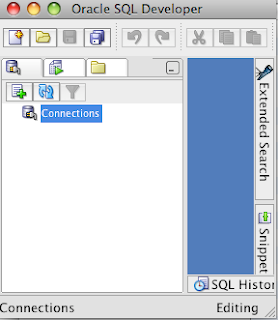


After starting Oracle SQL Developer, go to the Tools Menu and choose Preferences. Then open up the Database Hierarchy and choose Third Party JDBC Drivers.
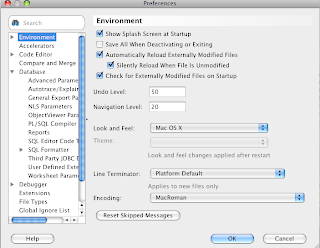


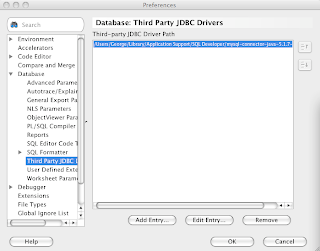
Then click on the Add Entry button to add the JAR file containing the JDBC Connector. I put the J Connector file in /Users/George/Library/Application Support/SQL Developer directory. In the File Browswer I then choose: Library | Application Support | SQL Developer, then selected the mysql-connector-java-5.1.7-bin.jar file. You will then see the jar file added.


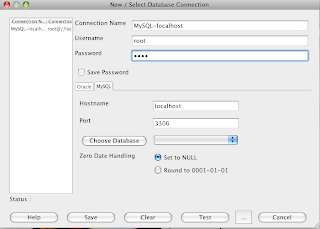
Then right click on the Connections Icon in the main window. It will then bring up a tab window showing Oracle and MySQL. Choose the MySQL tab. Enter a connection name, username and password. Then test the connection. You will then see your new MySQL connection below the Connections Icon in the main window. Double click on your MySQL connection and start writing queries. Then hit the green arrow button to execute the SQL statement.


Oracle has some great tutorials on how to get started with SQL Developer.


Have fun!

Sunday, February 17, 2008

MySQL Migration Toolkit


The MySQL Migration Toolkit is a nice easy to use Wizard GUI tool for migrating databases to MySQL. The following site http://www.mysql.com/products/tools/migration-toolkit/ has some really nice tutorials for how to migrate the following databases to MySQL:
  • SQL Server
  • Oracle
  • Access
The MySQL Migration Toolkit will facilitate the migration of the following database schema objects:
  • Tables
  • Indexes
  • Views
  • Assists with Stored Procedure Migration
  • Assists with Trigger Migration
Some features that stand out about the MySQL Migration Toolkit:
  • The MySQL Migration Toolkit allows direct server to server migration. The migration tookkit can run remotely.
  • Data can be transfered online or a snapshot of the data can be stored for executing a transfer offline at a later time. A backup can be created of the stored data as well.
Migrating Access to MySQL
MySQL is an excellent migration strategy for organizations using Access. Migrating to MySQL provides the following benefits to existing Access environments:
  • Extremely low startup costs.
  • Ability to leverage the LAMP stack and Web 2.0.
  • Portability to major releases of Linux, Unix and Mac OS platforms.
  • Increased operational flexibility from a closed proprietary environment to open source.
  • Significantly increased scalability.
Migrating SQL Server to MySQL
MySQL is an excellent migration strategy for organizations using SQL Server. Migrating to MySQL provides the following benefits to existing SQL Server environments:
  • Extremely low startup costs.
  • Ability to leverage the LAMP stack and Web 2.0.
  • Portability to major releases of Linux, Unix and Mac OS platforms.
  • Increased operational flexibility from a closed proprietary environment to open source.
  • Relatively low cost increased scalability compared to SQL Server scalability costs.
Oracle and MySQL Environments
I believe Oracle and MySQL play well together more than any other two RDBMS systems.
  • MySQL does well in the small and medium database range and supports the LAMP stack and Web 2.0.
  • For web applications that do not leverage a lot of database features. Using MySQL at the lower end can greatly reduce the total cost of ownership.
  • Oracle and MySQL can play very well together to maximize what a customer needs to do while minimizing cost.
  • Oracle offers tremendous scalability and an incredible amount of features to address complex problems in large organizations.
  • MySQL offers relatively low cost increased scalability compared to Oracle scalability costs. No costs associated with using partitioning and replication. MySQL Cluster is a fraction of the cost of running Oracle RAC.

Thursday, December 6, 2007

Favorite 3rd party software with MySQL

Here are the results of a small poll I conducted on favorite 3rd party software with MySQL. The poll results are:
  • SQLYog 48%
  • Nagios 15%
  • Other 14%
  • Toad 10%
  • Navicat 7%
  • DBArtisan 3%
  • Innodb Hot Backup 1%
  • BMC 1%
  • Cfengine 1%
  • Zmanda 0%
Since this was an informal poll (take with a grain of salt), so I wanted to add a few insights I have found in customers that I have been working with.
  • SQLYog and Nagios are very popular in MySQL environments.
  • Navicat has its own fan base in the MySQL world.
  • Toad althought popular in the Oracle world is very quirky when used with MySQL.
  • Zmanda althought it did not get any votes, I do see it being used quite a bit by students in my classes.
  • I was really surprised that I do not see a lot of people using InnoDB Hot Backup.

Friday, November 2, 2007

MySQL and VMWARE

VMWARE keeps popping up in more and more clients I go to. Virtualized environments are continuing to evolve. Companies are looking for more ways to stream line costs and improve efficiency and virtualized environments are one way to accomplish this.

Observations on virtualized database environments is that this is still an area that needs to mature a lot before being put in production environments. Don't get seduced to the dark side unless you understand all the issues. Thoughts on virtualization for MySQL:
  • Production databases - No way, nope, nyet, nien, bu shi, iie.
  • Test databases - When bench marking and performance tuning are not factors at the time, virtualized environments can play a role here. Has to be used in a controlled environment.
  • Development databases - Extremely efficient and cost effective.
I personally run Apple MacBook Pros and enjoy working with VMWare Fusion and Parallels. In my simple test environments I am running MySQL Servers, Oracle Servers, Eclipse, JDeveloper, Apache, JBoss and the Oracle Application Server in Solaris, Enterprise Linux and Fedora 7 environments. I'll eventually load a version of Vista. I save my VMs and then it is really easy for me to create a new copy of my VM from a backup. VM is a great environment for new MySQL DBAs to play around with different configurations, running multiple servers, etc. DBAs can also use VM's to create a new test or development database environment in a matter of minutes.

Definition of Virtualization

We are all seeing that virtualization will be an area of continued growth. Virtualization from Wikipedia:
In computing virtualization is a broad term that refers to the abstraction of computer resources. One useful definition is "a technique for hiding the physical characteristics of computing resources from the way in which other systems, applications, or end users, interact with those resources. This includes making a single physical resource (such as a server, an operating system, an application, or storage device appear to function as multiple logical resources; or it can include making multiple physical resources (such as storage devices or servers) appear as a single logical resource."

As you are well aware, each vendor has their own definition of virtualization. In the Wikipedia definition (above), they define platform virtualization, resource virtualization as well as some good virtualization examples.

The Role of MySQL in Virtualization

As databases continue their rapid growth and proliferation, organizations are looking for more ways to reduce hardware and software costs. Large vendors don't want customers to look at hardware and software from a commodity perspective. However, powerful open source solutions are giving organizations a lot more flexibility in purchase decisions. Open source solutions offer much more cost effective solutions with MySQL, Linux, Intel (and AMD) hardware with muliple CPUs. We can definitely expect that solutions like MySQL and Linux will play a large role in virtualized environments today and in the future.

There is also a new forum at http://forums.mysql.com on discussing VMWare and MySQL if you have comments.

Thursday, November 1, 2007

MySQL: Favorite 3rd Party Software

I've started a new poll on popular 3rd party software used with MySQL. I've recently been involved in a lot of discussions on favorite software used by MySQL DBAs. I realize there are a lot of great solutions. I narrowed the list to a few software solutions that I've had a lot of discussions about in the last few weeks with students and clients.

I decided to restart the poll by adding SQLYog. Below are the initial numbers before restarting the poll. I won't restart the poll again. These numbers will be included in the summary blog after the poll closes.
  • Nagios 6
  • Cfengine 0
  • Navicat 3
  • Quest (Toad) 6
  • Zmanda 0
  • Embarcadero (DBArtisan) 1
  • Innodb Hot Backup 1
  • Other 6
As databases proliferate in numbers, companies are struggling more with deciding what is the right tool to monitor and manage our databases. Especially with MySQL which is likely to run in a heterogeneous environment. Do I use open source tools or do I use tools like BMC, Quest and Embarcadero to help me manage a heterogeneous environment? I've been involved in a lot of discussions on this in the last year. I hope you are lookig forward to seeing how the numbers shake out as much as I am.

I hope you don't get frustrated if you don't see your favorite tool on the list. I wanted to keep the list to a top ten and on software that has been hot in a lot of conversations lately and make sure this wasn't just my list. At the same time Lake City, CO in the San Juan Mountains did not make my top ten list in CO, still not sure how that happened. Lake City, CO is an absolutely beautiful place in Colorado.

In this list is a mix of tools very popular in heterogenous environments, mixed with tools that are popular in the open source world. It includes development tools, DBA and monitoring tools. The goal is to get a feel if organizations lean towards heterogeneous tools or if for MySQL they focus on tools specific to MySQL environments.

Another issue not addressed by this poll is the management of multi-tiered infractructures which brings in the application server and web server. The whole question of how to manage multi-tiered infrastructures is a completely different poll.

The list includes:
  • Nagios
  • SQLYog
  • Cfengine
  • Navicat
  • Quest (Toad)
  • Zmanda
  • Embarcadero (E/R studio)
  • Innodb Hot Backup
  • BMC
  • Other
I did not include MySQL Enterprise Monitor or MySQL Query Browser since they are MySQL tools. The goal was to see what products outside of MySQL stand out.

Tuesday, October 16, 2007

MySQL Administration Tools

Which tools to use as a MySQL DBA to monitor and manage a MySQL environment with multiple MySQL servers? Coming from an Oracle world, an Oracle DBA is used to OEM Grid Control, Embarcadero, Quest Software, BMC, etc. So what tools make the most sense in a MySQL world?

I'm also a bit twidler from way back. In this day of technology, vi is still my favorite editor. The days of writing cool scripts as a DBA, is like the day of the Gunfighter, those days are over. Every script written adds more administration and maintenance to a complex environment. Although I grew up in the days of writing awk, sed, shell and perl scripts using software for monitoring and management is more scalable and cost-effective for managing multiple databases. In this complex environment, DBAs need to use software to help with the monitoring and maintenance of a large complex database environment.

The following tools are popular in MySQL environments:
  • Mytop - Is a tool for monitoring threads and MySQL performance similar to the Unix top program.
  • phpMyAdmin - A web-based MySQL DBA administration tool for managing MySQL, users, tables, running queries, etc.
  • innotop - An InnoDB and MySQL monitor tool.
  • Nagios - is a monitoring tool for hosts, services and networks.
  • MySQLMonitor - The MySQL Enterprise Network Monitoring and Advisory Services tool is a tool for monitoring a MySQL environment with multiple advisors that offers a lot of benefits.
Additional tools recommended by readers.
  • Cacti - A network graphing solution.
  • OpenNMS - An open source network management platform.